
 stumpylogandClaude Opus 5
a65efd3e4c
stumpylogandClaude Opus 5
a65efd3e4c
The wildcard caveat still described the pre-alternatives world: "where
stemming shortens a word, a pattern that reaches past the point it was cut
off matches nothing". Measured against a real index that is false for most
of the set it ranges over. university*, companie*, happiness* and
universities* all match, because the stem of the typed run is offered as a
second branch. Only a fragment landing strictly between the stem and the
surface form fails, which is what both of the examples happened to be, so
the sentence read as convincing. A user who believed it would type a
shorter fragment, which genuinely finds nothing, instead of the full word,
which works.

The rule stated now is the measured one: a trailing * matches a stored term
when either the run as typed or its stem is a prefix of that term. Both
branches are load-bearing, verified one word per document. copy* reaches
"copies" only via the stem and "copyright" only via the surface form, so a
rule naming just the stem would predict the wrong answer for half of it.

Also corrects two more claims that were each defensible alone and wrong
together, both measured before rewriting:

- checksum patterns are lowercased even though checksum terms are stored
  verbatim, so checksum:9F86D081* does match; "matched exactly as typed and
  nothing else" told the reader otherwise. Pinned as a positive case beside
  the uppercase *term* that really does fail.
- relative offsets and long-form dates must be quoted only as a value
  standing alone; added:[-1 week to now] works unquoted and returns the same
  documents as the quoted spelling.

test_pattern_stemming.py's partial-prefix docstring was fabricated: it said
"librar" stems to the longer "librari" and so matches nothing on its own.
Measured, the stemmer leaves "librar" alone, "univers" stems to the shorter
"univ", and librari* does match this file's own fixture. Rewritten against
measured values, and renamed, since a future editor reasoning from it would
have believed these params exercise the two-alternative path. They do not,
so a regression breaking that path would have left them green.

Co-Authored-By: Claude Opus 5 <noreply@anthropic.com>





Paperless-ngx
Paperless-ngx is a document management system that transforms your physical documents into a searchable online archive so you can keep, well, less paper.
Paperless-ngx is the official successor to the original Paperless & Paperless-ng projects and is designed to distribute the responsibility of advancing and supporting the project among a team of people. Consider joining us!
Thanks to the generous folks at DigitalOcean, a demo is available at demo.paperless-ngx.com using login demo / demo. Note: demo content is reset frequently and confidential information should not be uploaded.
This project is supported by:

Features
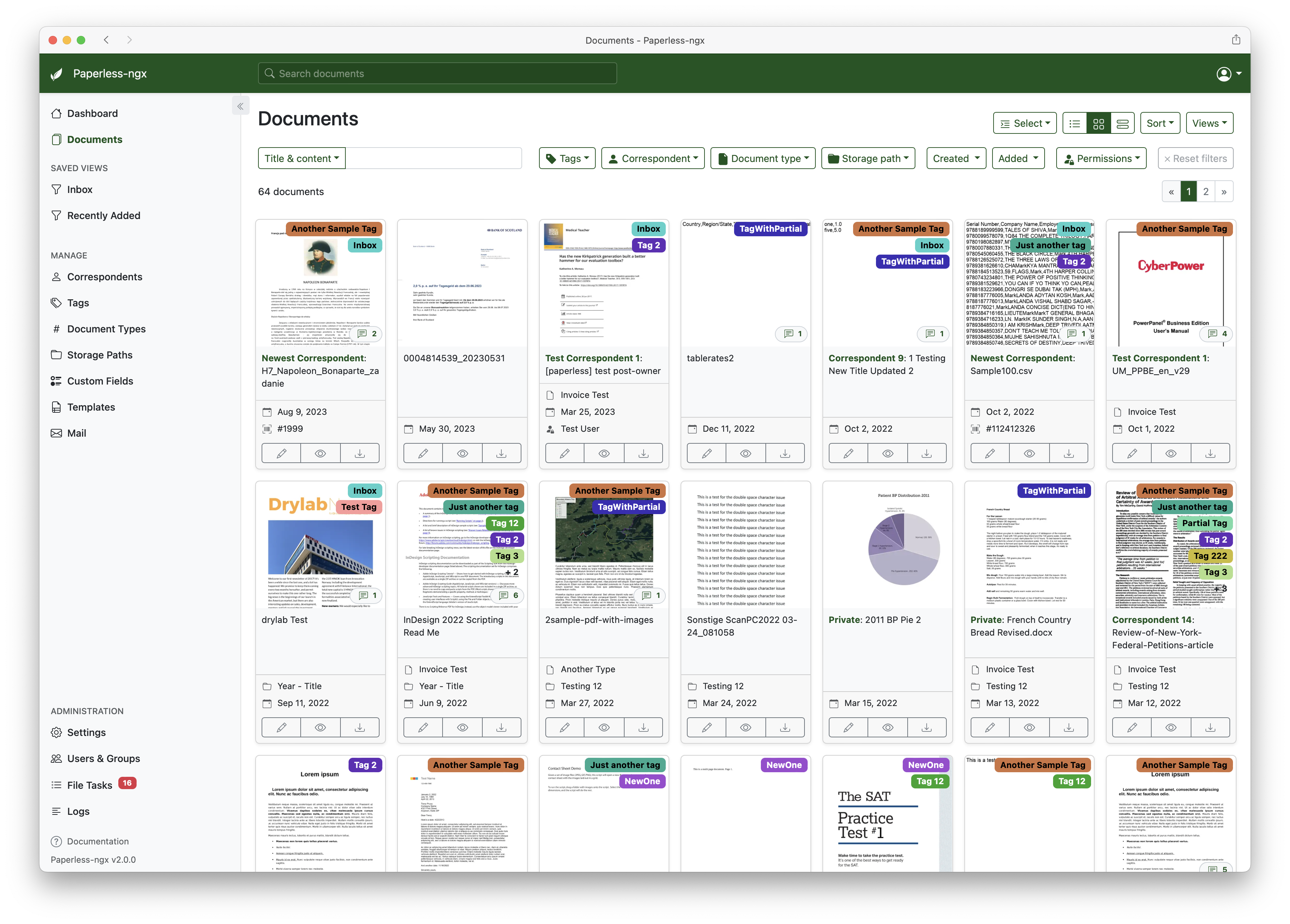
A full list of features and screenshots are available in the documentation.
Getting started
The easiest way to deploy paperless is docker compose. The files in the /docker/compose directory are configured to pull the image from the GitHub container registry.
If you'd like to jump right in, you can configure a docker compose environment with our install script:
bash -c "$(curl -L https://raw.githubusercontent.com/paperless-ngx/paperless-ngx/main/install-paperless-ngx.sh)"
More details and step-by-step guides for alternative installation methods can be found in the documentation.
Migrating from Paperless-ng is easy, just drop in the new docker image! See the documentation on migrating for more details.
Documentation
The documentation for Paperless-ngx is available at https://docs.paperless-ngx.com.
Contributing
If you feel like contributing to the project, please do! Bug fixes, enhancements, visual fixes etc. are always welcome. If you want to implement something big: Please start a discussion about that! The documentation has some basic information on how to get started.
Community Support
People interested in continuing the work on paperless-ngx are encouraged to reach out here on github and in the Matrix Room. If you would like to contribute to the project on an ongoing basis there are multiple teams (frontend, ci/cd, etc) that could use your help so please reach out!
Translation
Paperless-ngx is available in many languages that are coordinated on Crowdin. If you want to help out by translating paperless-ngx into your language, please head over to https://crowdin.com/project/paperless-ngx, and thank you! More details can be found in CONTRIBUTING.md.
Feature Requests
Feature requests can be submitted via GitHub Discussions, you can search for existing ideas, add your own and vote for the ones you care about.
Bugs
For bugs please open an issue or start a discussion if you have questions.
Related Projects
Please see the wiki for a user-maintained list of related projects and software that is compatible with Paperless-ngx.
Important Note
Document scanners are typically used to scan sensitive documents like your social insurance number, tax records, invoices, etc. Paperless-ngx should never be run on an untrusted host because information is stored in clear text without encryption. No guarantees are made regarding security (but we do try!) and you use the app at your own risk. The safest way to run Paperless-ngx is on a local server in your own home with backups in place.