 55c51cb89e
Implement the new decoupled archive/OCR control in RasterisedDocumentParser:

- construct_ocrmypdf_parameters(): add skip_text parameter; fix AUTO mode
  dispatch so skip_text is only added when explicitly requested (text-present
  + produce_archive case) rather than unconditionally; add OFF mode support.

- parse(): remove archive_file_generation checks; control archive creation
  exclusively via the produce_archive bool passed by the consumer.
  - OFF + no archive: return pdftotext text, skip OCRmyPDF entirely.
  - OFF + image + archive: use new _convert_image_to_pdfa() helper.
  - OFF + PDF + archive: run OCRmyPDF with skip_text=True (PDF/A only).
  - AUTO + text + no archive: skip OCRmyPDF entirely (fast path).
  - AUTO + text + archive: run OCRmyPDF with skip_text=True.
  - AUTO + no text: run normal OCR regardless of produce_archive.
  - FORCE/REDO: always run OCRmyPDF; set archive_path only when produce_archive.

- Add _convert_image_to_pdfa(): img2pdf wrapping + pikepdf PDF/A-2b stamping
  without invoking Tesseract or Ghostscript.

- Add PriorOcrFoundError to the fallback exception list (same treatment as
  InputFileError: retry with force_ocr).

- Update existing tests to use produce_archive instead of archive_file_generation:
  TestSkipArchive rewritten; RTL test uses mode=off to preserve Arabic text
  layer; AUTO mode tests clarified.

- Add test_parse_modes.py: 11 focused unit tests with mocked ocrmypdf.ocr
  verifying control flow for all mode/produce_archive combinations.

Co-Authored-By: Claude Sonnet 4.6 <noreply@anthropic.com>





Paperless-ngx
Paperless-ngx is a document management system that transforms your physical documents into a searchable online archive so you can keep, well, less paper.
Paperless-ngx is the official successor to the original Paperless & Paperless-ng projects and is designed to distribute the responsibility of advancing and supporting the project among a team of people. Consider joining us!
Thanks to the generous folks at DigitalOcean, a demo is available at demo.paperless-ngx.com using login demo / demo. Note: demo content is reset frequently and confidential information should not be uploaded.
This project is supported by:

Features
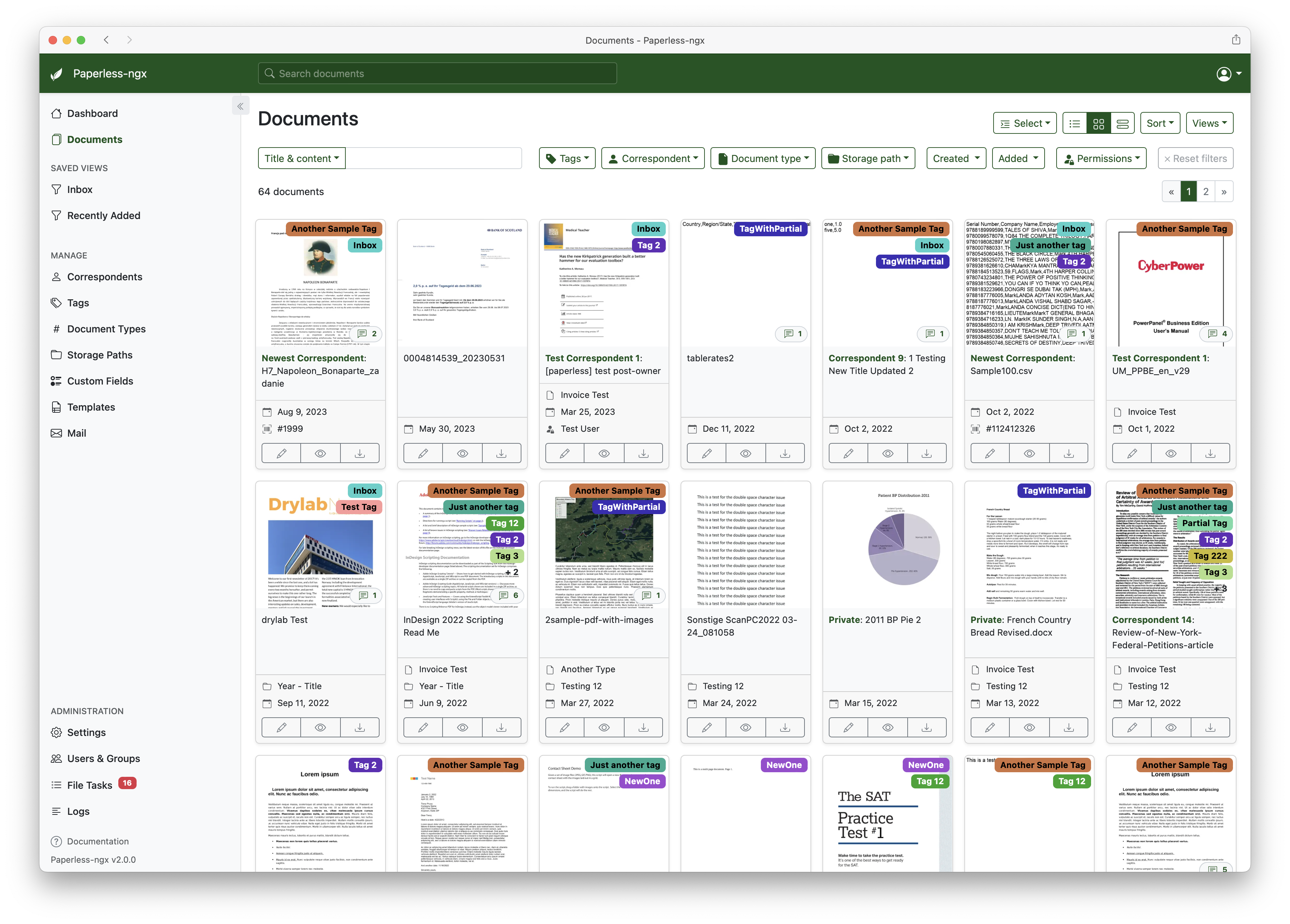
A full list of features and screenshots are available in the documentation.
Getting started
The easiest way to deploy paperless is docker compose. The files in the /docker/compose directory are configured to pull the image from the GitHub container registry.
If you'd like to jump right in, you can configure a docker compose environment with our install script:
bash -c "$(curl -L https://raw.githubusercontent.com/paperless-ngx/paperless-ngx/main/install-paperless-ngx.sh)"
More details and step-by-step guides for alternative installation methods can be found in the documentation.
Migrating from Paperless-ng is easy, just drop in the new docker image! See the documentation on migrating for more details.
Documentation
The documentation for Paperless-ngx is available at https://docs.paperless-ngx.com.
Contributing
If you feel like contributing to the project, please do! Bug fixes, enhancements, visual fixes etc. are always welcome. If you want to implement something big: Please start a discussion about that! The documentation has some basic information on how to get started.
Community Support
People interested in continuing the work on paperless-ngx are encouraged to reach out here on github and in the Matrix Room. If you would like to contribute to the project on an ongoing basis there are multiple teams (frontend, ci/cd, etc) that could use your help so please reach out!
Translation
Paperless-ngx is available in many languages that are coordinated on Crowdin. If you want to help out by translating paperless-ngx into your language, please head over to https://crowdin.com/project/paperless-ngx, and thank you! More details can be found in CONTRIBUTING.md.
Feature Requests
Feature requests can be submitted via GitHub Discussions, you can search for existing ideas, add your own and vote for the ones you care about.
Bugs
For bugs please open an issue or start a discussion if you have questions.
Related Projects
Please see the wiki for a user-maintained list of related projects and software that is compatible with Paperless-ngx.
Important Note
Document scanners are typically used to scan sensitive documents like your social insurance number, tax records, invoices, etc. Paperless-ngx should never be run on an untrusted host because information is stored in clear text without encryption. No guarantees are made regarding security (but we do try!) and you use the app at your own risk. The safest way to run Paperless-ngx is on a local server in your own home with backups in place.