
 Trenton HandClaude Sonnet 4.6
2cbe6ae892
Trenton HandClaude Sonnet 4.6
2cbe6ae892
* Refactor: move remote parser, test, and sample to paperless.parsers

Relocates three files to their new homes in the parser plugin system:

- src/paperless_remote/parsers.py
    → src/paperless/parsers/remote.py
- src/paperless_remote/tests/test_parser.py
    → src/paperless/tests/parsers/test_remote_parser.py
- src/paperless_remote/tests/samples/simple-digital.pdf
    → src/paperless/tests/samples/remote/simple-digital.pdf

Content and imports will be updated in the follow-up commit that
rewrites the parser to the new ParserProtocol interface.

Co-Authored-By: Claude Sonnet 4.6 <noreply@anthropic.com>

* Feature: migrate RemoteDocumentParser to ParserProtocol interface

Rewrites the remote OCR parser to the new plugin system contract:

- `supported_mime_types()` is now a classmethod that always returns the
  full set of 7 MIME types; the old instance-method hack (returning {}
  when unconfigured) is removed
- `score()` classmethod returns None when no remote engine is configured
  (making the parser invisible to the registry), and 20 when active —
  higher than the tesseract default of 10 so the remote engine takes
  priority when both are available
- No longer inherits from RasterisedDocumentParser; inherits no parser
  class at all — just implements the protocol directly
- `can_produce_archive = True`; `requires_pdf_rendition = False`
- `_azure_ai_vision_parse()` takes explicit config arg; API client
  created and closed within the method
- `get_page_count()` returns the PDF page count for application/pdf,
  delegating to the new `get_page_count_for_pdf()` utility
- `extract_metadata()` delegates to `extract_pdf_metadata()` for PDFs;
  returns [] for all other MIME types

New files:
- `src/paperless/parsers/utils.py` — shared `extract_pdf_metadata()` and
  `get_page_count_for_pdf()` utilities (pikepdf-based); both the remote
  and tesseract parsers will use these going forward
- `src/paperless/tests/parsers/test_remote_parser.py` — 42 pytest-style
  tests using pytest-django `settings` and pytest-mock `mocker` fixtures
- `src/paperless/tests/parsers/conftest.py` — remote parser instance,
  sample-file, and settings-helper fixtures

Co-Authored-By: Claude Sonnet 4.6 <noreply@anthropic.com>

* Refactor: use fixture factory and usefixtures in remote parser tests

- `_make_azure_mock` helper promoted to `make_azure_mock` factory fixture
  in conftest.py; tests call `make_azure_mock()` or
  `make_azure_mock("custom text")` instead of a module-level function
- `azure_settings` and `no_engine_settings` applied via
  `@pytest.mark.usefixtures` wherever their value is not referenced
  inside the test body; `TestRemoteParserParseError` marked at the class
  level since all three tests need the same setting

Co-Authored-By: Claude Sonnet 4.6 <noreply@anthropic.com>

* Refactor: improve remote parser test fixture structure

- make_azure_mock moved from conftest.py back into test_remote_parser.py;
  it is specific to that module and does not belong in shared fixtures
- azure_client fixture composes azure_settings + make_azure_mock + patch
  in one step; tests no longer repeat the mocker.patch call or carry an
  unused azure_settings parameter
- failing_azure_client fixture similarly composes azure_settings + patch
  with a RuntimeError side effect; TestRemoteParserParseError now only
  receives the mock it actually uses
- All @pytest.mark.parametrize calls use pytest.param with explicit ids
  (pdf, png, jpeg, ...) for readable test output

Co-Authored-By: Claude Sonnet 4.6 <noreply@anthropic.com>

* Refactor: wire RemoteDocumentParser into consumer and fix signals

- paperless_remote/signals.py: import from paperless.parsers.remote
  (new location after git mv). supported_mime_types() is now a
  classmethod that always returns the full set, so get_supported_mime_types()
  in the signal layer explicitly checks RemoteEngineConfig validity and
  returns {} when unconfigured — preserving the old behaviour where an
  unconfigured remote parser does not register for any MIME types.

- documents/consumer.py: extend the _parser_cleanup() shim, parse()
  dispatch, and get_thumbnail() dispatch to include RemoteDocumentParser
  alongside TextDocumentParser. Both new-style parsers use __exit__
  for cleanup and take (document_path, mime_type) without a file_name
  argument.

Co-Authored-By: Claude Sonnet 4.6 <noreply@anthropic.com>

* Refactor: fix type errors in remote parser and signals

- remote.py: add `if TYPE_CHECKING: assert` guards before the Azure
  client construction to narrow config.endpoint and config.api_key from
  str|None to str. The narrowing is safe: engine_is_valid() guarantees
  both are non-None when it returns True (api_key explicitly; endpoint
  via `not (engine=="azureai" and endpoint is None)` for the only valid
  engine). Asserts are wrapped in TYPE_CHECKING so they carry zero
  runtime cost.

- signals.py: add full type annotations — return types, Any-typed
  sender parameter, and explicit logging_group argument replacing *args.
  Add `from __future__ import annotations` for consistent annotation style.

Co-Authored-By: Claude Sonnet 4.6 <noreply@anthropic.com>

* Fix: get_parser factory forwards logging_group, drops progress_callback

consumer.py calls parser_class(logging_group, progress_callback=...).
RemoteDocumentParser.__init__ accepts logging_group but not
progress_callback, so only the latter is dropped — matching the pattern
established by the TextDocumentParser signals shim.

Co-Authored-By: Claude Sonnet 4.6 <noreply@anthropic.com>

* Fix: text parser get_parser forwards logging_group, drops progress_callback

TextDocumentParser.__init__ accepts logging_group: object = None, same
as RemoteDocumentParser. The old shim incorrectly dropped it; fix to
forward it as a positional arg and only drop progress_callback.
Add type annotations and from __future__ import annotations for
consistency with the remote parser signals shim.

Co-Authored-By: Claude Sonnet 4.6 <noreply@anthropic.com>

---------

Co-authored-by: Claude Sonnet 4.6 <noreply@anthropic.com>





Paperless-ngx
Paperless-ngx is a document management system that transforms your physical documents into a searchable online archive so you can keep, well, less paper.
Paperless-ngx is the official successor to the original Paperless & Paperless-ng projects and is designed to distribute the responsibility of advancing and supporting the project among a team of people. Consider joining us!
Thanks to the generous folks at DigitalOcean, a demo is available at demo.paperless-ngx.com using login demo / demo. Note: demo content is reset frequently and confidential information should not be uploaded.
This project is supported by:

Features
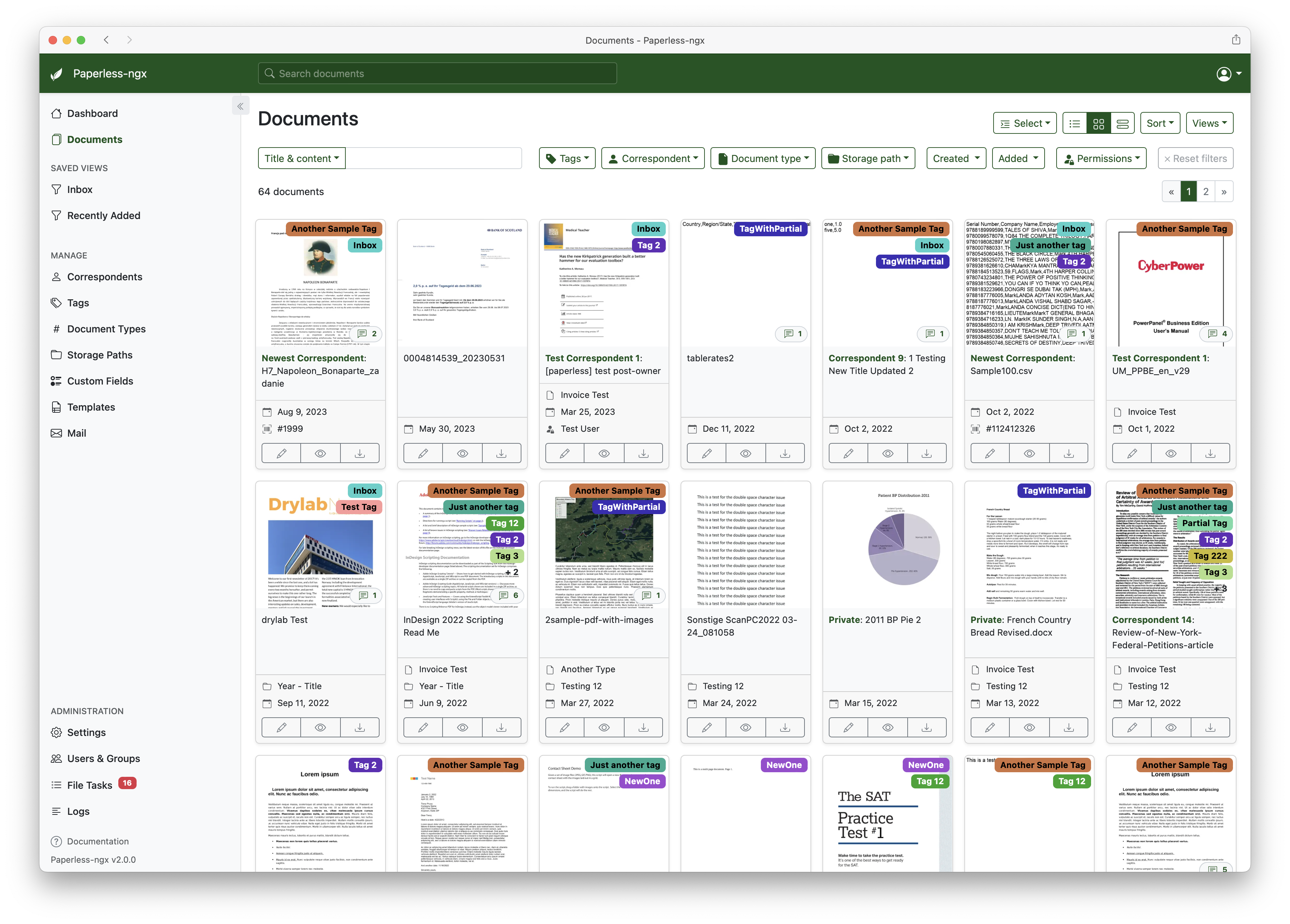
A full list of features and screenshots are available in the documentation.
Getting started
The easiest way to deploy paperless is docker compose. The files in the /docker/compose directory are configured to pull the image from the GitHub container registry.
If you'd like to jump right in, you can configure a docker compose environment with our install script:
bash -c "$(curl -L https://raw.githubusercontent.com/paperless-ngx/paperless-ngx/main/install-paperless-ngx.sh)"
More details and step-by-step guides for alternative installation methods can be found in the documentation.
Migrating from Paperless-ng is easy, just drop in the new docker image! See the documentation on migrating for more details.
Documentation
The documentation for Paperless-ngx is available at https://docs.paperless-ngx.com.
Contributing
If you feel like contributing to the project, please do! Bug fixes, enhancements, visual fixes etc. are always welcome. If you want to implement something big: Please start a discussion about that! The documentation has some basic information on how to get started.
Community Support
People interested in continuing the work on paperless-ngx are encouraged to reach out here on github and in the Matrix Room. If you would like to contribute to the project on an ongoing basis there are multiple teams (frontend, ci/cd, etc) that could use your help so please reach out!
Translation
Paperless-ngx is available in many languages that are coordinated on Crowdin. If you want to help out by translating paperless-ngx into your language, please head over to https://crowdin.com/project/paperless-ngx, and thank you! More details can be found in CONTRIBUTING.md.
Feature Requests
Feature requests can be submitted via GitHub Discussions, you can search for existing ideas, add your own and vote for the ones you care about.
Bugs
For bugs please open an issue or start a discussion if you have questions.
Related Projects
Please see the wiki for a user-maintained list of related projects and software that is compatible with Paperless-ngx.
Important Note
Document scanners are typically used to scan sensitive documents like your social insurance number, tax records, invoices, etc. Paperless-ngx should never be run on an untrusted host because information is stored in clear text without encryption. No guarantees are made regarding security (but we do try!) and you use the app at your own risk. The safest way to run Paperless-ngx is on a local server in your own home with backups in place.